Nuxt
In Nuxtjs application, that's separate directory structure flow to implement your application.
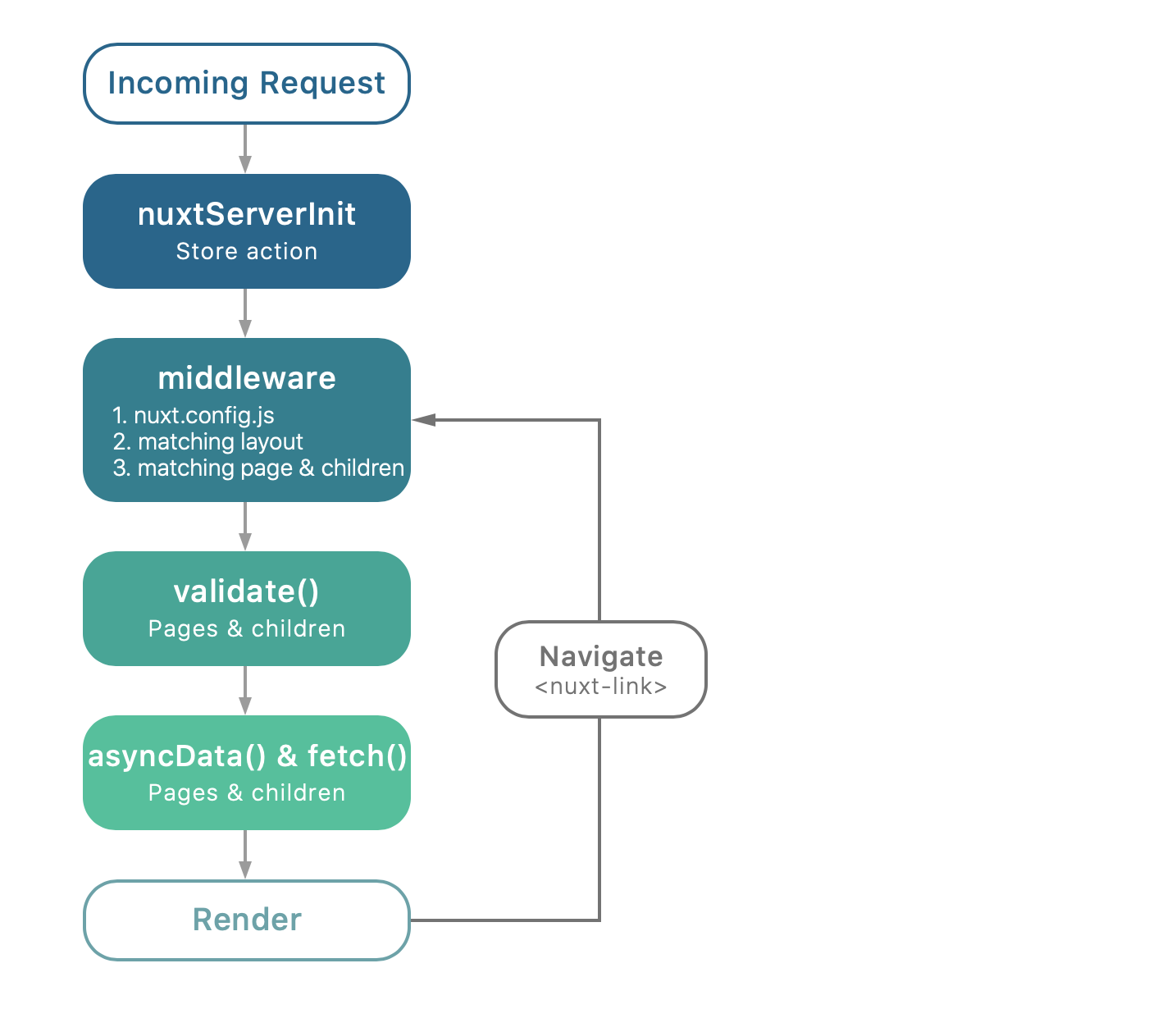
This schema shows what is called by Nuxt.js when the server is called or when the user navigates through the app via <nuxt-link>:
# Section Nuxt with Azure AD ⭐️
# Setting Authentication
Register Authentication
# Add the Azure AD to Nuxt
To use Azure AD in your Nuxtjs application, you will need the adal package. Go to your command terminal and run the following command.
npm install adal-angular
::: warning adal.js has implemented by implicit flow Implicit Grant. Read more :::
# Adal util
You need to setting global configuration for adal that includes util functions. To do that, create new folder named is lib in current root folder. In that folder, create new file adal-util.js
Add code following here
// import package
import AuthenticationContext from 'adal-angular/lib/adal.js'

// define function get redirectUri
// Refercence: https://nuxtjs.org/api/context/
export function getRedirectUri() {
  // server-side
  if (process.server) {
    return '<your_domain_server>/auth/callback'
  }
  // client-side
  if (process.client) {
    return '<your_domain_local>/auth/callback'
  }
}

// define function get client Id
export function getClientId() {
  return '<your_clientid>' // your client id
}

// Intial config
export function createAdalContext() {
  return new AuthenticationContext({
    tenant: '<your_tenantid>', // your tenant
    clientId: getClientId(),
    redirectUri: getRedirectUri(),
    popUp: false,
    cacheLocation: 'sessionStorage'
  })
}
# Store
Nuxt using a store to manage that state is important for every project.
In store folder, create new file named index.js. Add following the code.
// import lib/util
import * as adalContext from '~/lib/adal-util'

// initial context
const adal = adalContext.createAdalContext()

// state
export const state = () => ({})

// mutations
export const mutations = {}

// actions
export const actions = {}
In state, you will need to define object and mutation functions
// state
export const state = () => ({
  userSigned: false,
  userInfo: {}
})

// mutations
export const mutations = {
  isSigned(state, data) {
    state.userSigned = true
    state.userInfo = data
  }
}
Then you will need to define function signIn and signOut in actions state
// actions
export const actions = {
  signIn({ commit }, data) {
    const user = adal.getCachedUser()
    adal.callback = (err) => { // callback if has error
      if (err) {
        alert(JSON.stringify(err))
      }
    }
    if (user) { // check user login and then call mutations commit
      commit('isSigned', (true, user))
    } else {
      adal.login()
    }
  },
  signOut() {
    adal.logOut()
  }
}
# Middleware
Set the middleware for a specific page of the application. In this case, we will need to set authenticate before access to page.
Create new file named adalauth.js. Add the following code here
// import lib/util
import * as adalContext from '~/lib/adal-util'

export default function initLogin({ store, redirect, route }) {
  const userIsLoggedIn = !!store.state.userSigned
  const adal = adalContext.createAdalContext()
  // eslint-disable-next-line nuxt/no-globals-in-created
  if (adal.isCallback(route.hash)) {
    // eslint-disable-next-line nuxt/no-globals-in-created
    adal.handleWindowCallback(route.hash)
  }
  // if user has not login yet
  if (!userIsLoggedIn) {
    // call store actions
    store.dispatch('signIn')
  }
  return Promise.resolve()
}
Then we need to register middleware module in nuxt.config.js
router: {
  middleware: ['adalauth'] // file named
}
Then setting callback functions after redirectUri return id_token
<your_domain>/auth/callback
In pages folder, create new folder named auth. In this folder, create new file callback.vue and add following code here.
<template>
  <div />
</template>
<script>
// import lib/util
import * as adalContext from '~/lib/adal-util'

export default {
  created() {
    const adal = adalContext.createAdalContext()
    // eslint-disable-next-line nuxt/no-globals-in-created
    if (adal.isCallback(window.location.hash)) {
      // eslint-disable-next-line nuxt/no-globals-in-created
      adal.handleWindowCallback(window.location.hash)
    }
  }
}
</script>
Now start your local dev server with npm run dev and view http://localhost:3000
# Section Nuxt with Identity Server 4
https://github.com/IdentityModel/oidc-client-js/wiki
# Section 3
Nuxt with Auth External API (JWT)
# Create store
// index.js